In short
- For composing and learning harmony (free): the Toool app
- Free on iPhone: GarageBand
- For beatmakers: FL Studio Mobile
- For collaborating: BandLab
- For sampling: Koala Sampler
- Full DAW: Cubasis
The phone: the musician's notebook in 2027
Ideas show up on the subway, in the shower or in the middle of the night, rarely at the computer. In 2027 the phone has become the tool for capturing them: a chord progression, a rhythm, a hummed melody. The best apps no longer just record: they help you compose, then export cleanly to your DAW to finish the track.
The 6 best music making apps for 2027
1. The Toool app: compose fast, even without knowing theory

Most music apps start from a blank screen. The Toool app starts from the idea: its chord generation offers assisted harmony suggestions, so you can build a progression that sounds good even without knowing theory. Add a rhythm with the sequencer, melodies and basslines with the pattern generator, and quality synth, drum and acoustic kit sounds.
Once the idea is in place, export the audio or MIDI to continue in your DAW. Free, with most essential features available, it suits beginners as well as producers who want to capture an idea in two minutes.
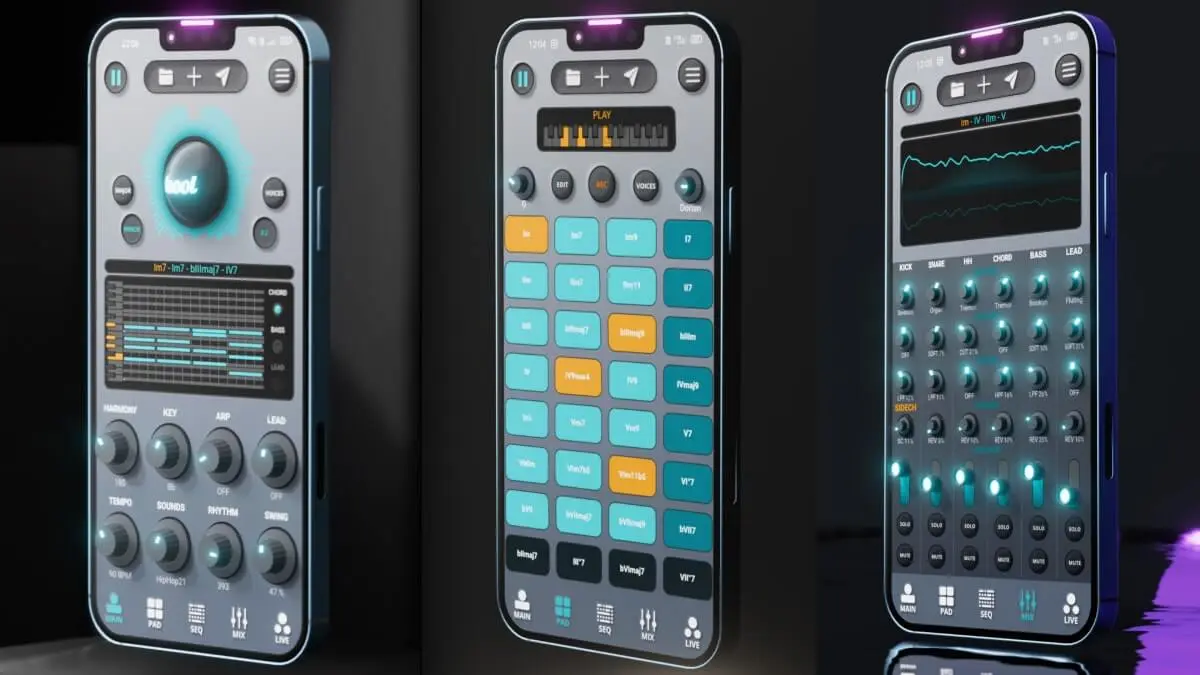
Toool App
Make music on your phone, finish it in your DAW.
Free on iOS & Android
See Toool App2. GarageBand: the free classic on iPhone
Touch instruments, multitrack recording, loops: Apple's free studio remains a reference. Its main drawback: it doesn't exist on Android.
3. FL Studio Mobile: beatmaking in your pocket
The famous sequencer in a mobile version, with step sequencer, piano roll and effects. Ideal for beatmakers who already work in FL Studio.
4. BandLab: create and collaborate
A free multitrack studio built for collaboration: share a project and everyone adds their part. Very popular with young musicians.
5. Koala Sampler: sample everything, everywhere
Record a sound with the mic, chop it, play it on pads: Koala makes sampling immediate and fun. A favorite of hip-hop and lo-fi producers.
6. Cubasis: a real DAW on a tablet
The mobile version of Cubase, with multitrack audio and MIDI, mixing and effects. The most complete for taking a track all the way to the finish on a tablet.
Quick comparison
| App | Platforms | Price | Strength |
|---|---|---|---|
| Toool | iOS, Android | Free | Assisted chords, fast ideas, export to the DAW |
| GarageBand | iOS | Free | Complete, simple studio |
| FL Studio Mobile | iOS, Android | Paid | Beatmaking |
| BandLab | Web, iOS, Android | Free | Collaboration |
| Koala Sampler | iOS, Android | Paid | Sampling |
| Cubasis | iOS, Android | Paid | Full DAW |
2027 verdict
To finish a track on a tablet, Cubasis is the most complete; for sampling, Koala; for collaborating, BandLab. But for most musicians, the phone is for capturing and developing ideas: the Toool app, free on iOS and Android, is the most effective way to turn a hunch into a chord progression and a rhythm, then take it into your DAW. See also the best plugins for beginners in 2027.
Frequently asked questions
What is the best free app for making music in 2027?
On iPhone and Android, the Toool app is our pick: it's free and helps you build chord progressions with assisted harmony suggestions, rhythms and melodies, then export the result to a computer. On iPhone only, GarageBand remains an excellent free option.
Can you make a real track on a phone?
Yes, apps like Cubasis or FL Studio Mobile let you go all the way to mixing. But most musicians use the phone to capture and develop the idea, then finish on a computer.
Which apps work on Android?
Toool, FL Studio Mobile, BandLab, Koala Sampler and Cubasis are all on Android. GarageBand is iPhone and iPad only.
How do you move from your phone to your DAW?
By exporting audio (WAV) or MIDI from the app and importing it into the DAW. MIDI lets you change the sounds and rework the notes later.