Why our ears fool us
Every day we make dozens of decisions while mixing: which compressor, which EQ setting, does this process really improve the sound? The problem is that our brain is a very poor judge. Volume, our expectations and even listening order distort perception.
The answer isn't "better ears" but a better method: comparing under fair conditions. That's exactly what audio comparison tools are for.
The three biases that skew your decisions
Loudness bias
- Just 1 to 2 dB more is enough to make a process seem "better".
- A louder signal hides its flaws more easily.
- Our ears are naturally drawn to whatever is louder.
Expectation bias
- A plugin's brand and price influence what we think we hear.
- The interface matters too: we "hear" what we see moving.
Time bias
- The recency effect favours the last version heard.
- Ear fatigue degrades judgement as the session goes on.
Comparison tools in 2027
1. Diffonic: blind comparison
Diffonic compares two signals, A and B, after automatically matching their level in LUFS. Any volume difference disappears: only the difference in sound remains.

Its most useful feature is blind test mode: six steps in which A and B are swapped after each answer, without you knowing which one you're hearing. At the end, an accuracy score tells you whether you really heard a difference… or not.
- Automatic LUFS matching between A and B.
- Six-step blind test with a final score.
- Uses: checking a plugin's impact, comparing two exports, a mix and its reference, two masters.
- Formats: VST3, AU, AAX, on Windows and macOS.
It's the ideal tool for honestly answering the questions we all ask: does 96 kHz really sound better? Does that expensive plugin add anything? Does this saturation improve the vocal?

Diffonic
Find out if a change really sounds better: level-matched A/B and blind test.
$29 $58 -50%
VST3 · AU · AAX · Windows & macOS
See Diffonic2. ADPTR Audio Metric AB: reference analysis
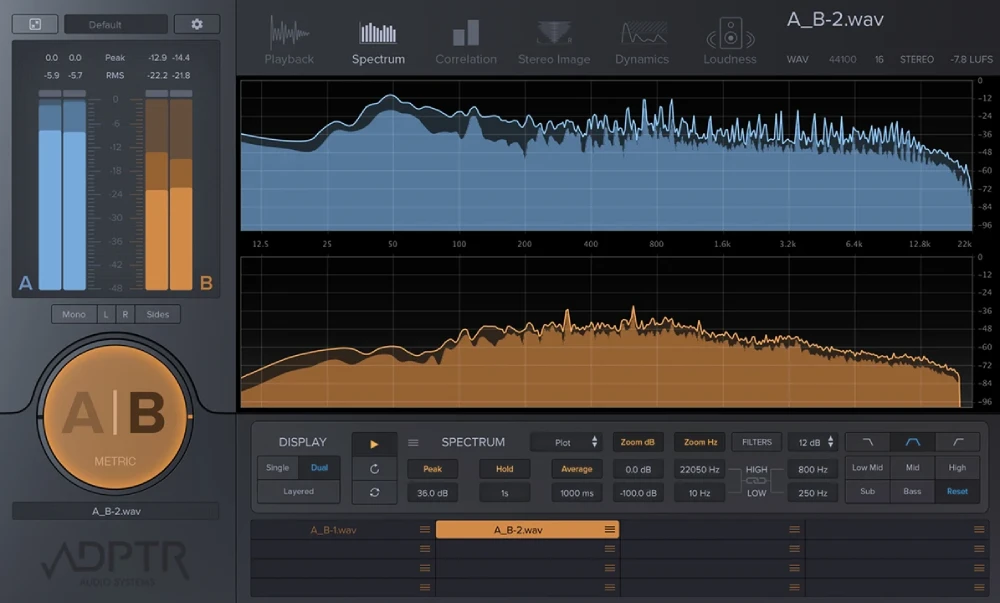
Metric AB loads several reference tracks and compares them with your mix using many analysis tools: spectrum, dynamics, stereo, loudness. Very thorough for placing a master against commercial productions.
- Pros: very detailed analysis, several references at once.
- Cons: a lot of visual information, which can push you to mix with your eyes instead of your ears.
3. Mastering The Mix REFERENCE: guided referencing
REFERENCE compares your mix with reference tracks, with level matching and visual hints about frequency and dynamic differences. An accessible approach for home studios.
- Pros: simple, educational, built-in level matching.
- Cons: focused on comparing with references, less on blind-testing your own processing.
4. Built-in DAW tools
Most DAWs let you compare two plugin settings or bypass a process. It's free, but with no level matching or blind test, the loudness bias is still there.
How to compare properly
- Match the volume before any listening (in LUFS, not by ear).
- Listen blind when the decision really matters.
- Use short passages (5 to 10 seconds) and repeat.
- Take breaks: ear fatigue skews everything.
- Write down your answers before looking at the result.
Summary
| Tool | Level matching | Blind test | Ideal for |
|---|---|---|---|
| Diffonic | Yes, automatic LUFS | Yes, six steps with a score | Validating a process, a plugin, an export |
| Metric AB | Yes | No | Detailed analysis against references |
| REFERENCE | Yes | No | Guided comparison with references |
| DAW tools | No | No | Quick checks |
Conclusion
To compare your mixes with commercial tracks, Metric AB and REFERENCE are excellent tools. To know whether your own decisions really improve the sound, Diffonic is our first choice for 2027: automatic LUFS matching and a blind test, with nothing but your ears.
Also read: our comparison of the best A/B comparison plugins of 2027 and the guide to blind testing with Diffonic.