


Mastered Saturation
When I started working on a saturation plugin, my goal was simple: create the ultimate tool while keeping it simple. I wanted a saturation capable of transforming a signal without sacrificing musicality, and above all, precise and reliable enough to be used on individual tracks, complete mixes, mastering, or buses.

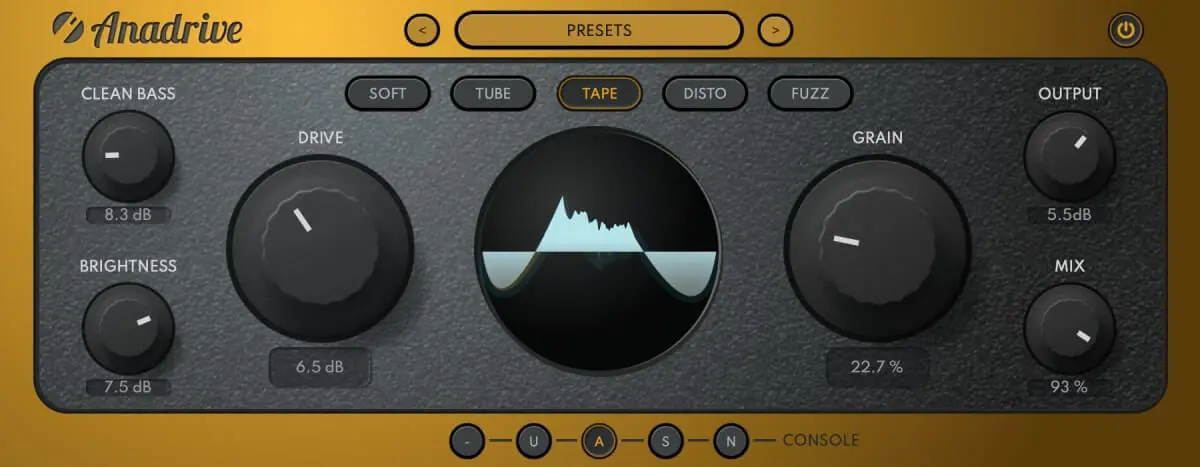
With Anadrive, I wanted to go beyond simple hardware emulation and take advantage of digital precision with analog musicality. Each section (SOFT / TUBE / TAPE / DISTO / FUZZ) has its own unique character, but it's the way the controls interact that changes everything.
DRIVE acts on the dynamics of the signal. It compresses and distorts following the typical behavior of the chosen section.
GRAIN enriches the harmonic texture, like an additional sonic signature, without further saturating the signal.
The ability to adjust these two aspects independently is something I've always dreamed of exploring. It's precisely this combination that gives Anadrive its unique character.


One of the most common problems with saturation is loss of impact in the low end. Saturating often means flattening: bass becomes murky and muddy, and energy dissipates.
CLEAN BASS restores a solid and clean low-end foundation, preserving both depth and punch, even when saturation is pushed to extremes. The aggressiveness of a saturated sound often comes from excess highs and loss of bass, which breaks the natural balance of the mix. With Clean Bass, you can saturate freely without ever sacrificing punch or precision.

Classic saturation often amplifies high frequencies in an unpleasant way, making listening fatiguing. I was looking for a more subtle, more musical solution, somewhat in the spirit of vintage aural exciters.
This is exactly what BRIGHTNESS offers. This control brings a sense of clarity and presence by working on the harmonic structure rather than simply boosting highs. The result is smooth and natural, letting the highs sit perfectly in the mix without causing listener fatigue.
Among the latest ideas I incorporated into Anadrive is Console Mode. I wanted to recapture that subtle sensation you perceive when a signal passes through an analog console: that little, almost invisible detail that brings life to the whole.

It's a sonic color that I haven't found in any other plugin, and it's one of the reasons why I absolutely wanted to add it. CONSOLE MODE offers a simple way to add character to the mix.
VST3, AU, AAX
macOS 10.13+ · Windows 10+ (64-bit)
Zero latency · 64-bit precision
SOFT, TUBE, TAPE, DISTO, FUZZ
U.ei / A.i / S.l / N.ve
Requires a connection to the internet occasionally
Anadrive offers 5 distinct saturation modes:
All Toool plugins support VST3, AU (Audio Units), and AAX formats. This ensures compatibility with virtually all modern DAWs including Ableton Live, Logic Pro, Pro Tools, FL Studio, Cubase, Reaper, and Studio One. You can learn more about our plugins on our homepage.
You can install your Toool plugins on up to 3 computers with a single license. This covers your studio setup, laptop, and backup machine. The plugins require occasional internet connection for license verification.
When you load a Toool plugin for the first time, it will ask for activation. Enter the license key from your purchase email. You'll need an internet connection for this initial activation. The plugin will remember your license for future use.


