What's inside Reverbia
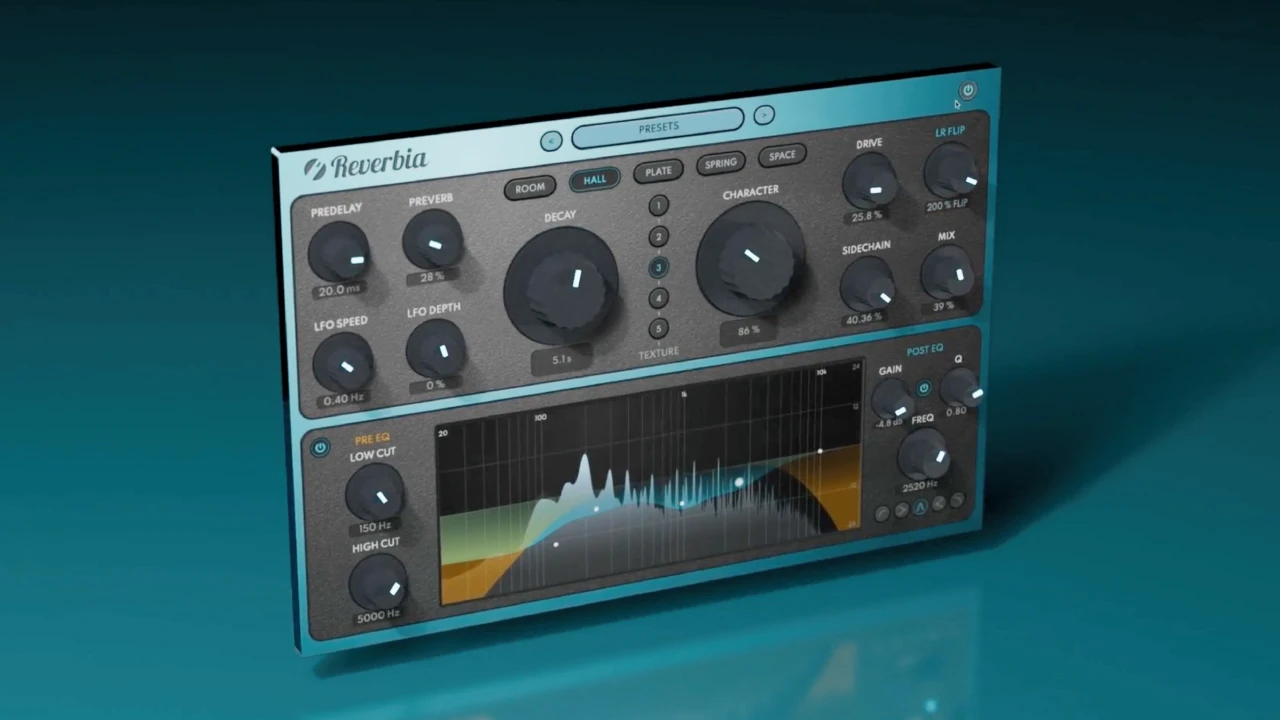
Reverbia brings together 25 reverbs: five families, each with five very different variations. Around them is everything you need to shape the tail without loading other plugins: CHARACTER, drive, dual EQ, stereo width, sidechain and a few hidden features.

The five families
ROOM: rooms
Short, natural spaces. Perfect for giving a vocal some air without pushing it back, or for drum ambience.
HALL: halls
Long, wide spaces. For ballads, strings, pads and anything that should sound big.
PLATE: the plate
The dense, bright sound of studio plates. The classic vocal reverb, and very effective on snare too.
SPRING: the spring
The metallic character of guitar-amp spring reverbs. Ideal on guitars and for retro effects.
SPACE: unreal spaces
Atmospheric ambiences that don't exist in reality. For pads, textures and sound design.
Within each family, the five variations are clearly different: take the time to hear them all on your source before setting anything else.
The CHARACTER knob
This is Reverbia's central control. It sets the reverb's personality: to the left, a more realistic and discreet sound; to the right, a wider, denser, more unreal reverb. For a natural mix, stay towards the left; for an obvious effect, turn it up decisively.
The other controls
- Dual EQ: one EQ before the reverb to keep only the essential part of the signal (cutting the lows avoids mud), another after it to shape the tail.
- DRIVE: adds grit to the tail; double-click to cycle through saturation types.
- WIDTH: stereo width, from mono-safe to very wide; double-click to swap left and right channels.
- SIDECHAIN: ducking lowers the reverb while the source plays and lets it come back in the gaps; double-click to switch to compressor mode.
- PREDELAY and DECAY: double-click to sync them to tempo.
The hidden features
- Shimmer: double-click PREVERB for an airy shimmer reverb.
- Tempo sync: double-click PREDELAY or DECAY.
- Drive types: double-click DRIVE.
- Compressor mode: double-click SIDECHAIN.
- Channel swap: double-click WIDTH.
Reverbia
The all-in-one reverb: 25 reverbs, from realistic rooms to otherworldly spaces.
$79 $158 -50%
VST3 · AU · AAX · Windows & macOS
See ReverbiaSettings by source
These values are starting points to adjust by ear. Ideally use Reverbia on a send (100% wet) and set the amount with the send level.
Lead vocal
- PLATE, CHARACTER fairly low to keep the vocal close.
- Predelay of 20 to 40 ms to separate the vocal from its reverb.
- Post EQ: roll off the highs around 8 kHz to soften sibilance.
- Ducking on so the words stay clear.
Drums
- ROOM for natural ambience.
- Short decay to keep the punch.
- Pre EQ: cut the lows so the kick doesn't go into the reverb.
Guitars
- SPRING for vintage colour.
- A little DRIVE to dirty up the tail.
Pads and ambiences
- SPACE or HALL, high CHARACTER.
- Long decay, or even shimmer for an airy texture.
- Wide WIDTH to envelop the listener.
Three mistakes to avoid
- Too much low end in the reverb: use the pre EQ to cut below 150 to 200 Hz.
- A reverb that masks the vocal: turn on ducking and add predelay.
- Judging by volume: more reverb often seems "better" at first. Compare at matched volume with Diffonic.
In short
Pick the family, listen to the five variations, set CHARACTER, then shape with the dual EQ and ducking: with these few steps, Reverbia gives you a musical space in minutes. To compare with other reverbs, see our comparison of the best reverbs of 2027.