The debate in 2027
AI is everywhere in audio tools: assistants that suggest a processing chain, EQs that "learn" the signal, online mastering services, stem separation. Does that mean you should let the machine mix? The honest answer is nuanced: AI saves time on some tasks, but it doesn't know what you want your track to say.
What "AI" means in mixing
- Assistants: the plugin listens to a section and suggests starting settings (EQ, compression, levels). That's the idea behind iZotope's assistants in Neutron and Ozone.
- Adaptive processing: plugins such as Sonible's "smart:" range analyse the signal to suggest a matching correction or compression.
- Online mastering: services such as LANDR deliver a master in minutes.
- Source separation: extracting a vocal, drums or bass from a stereo mix, now built into several DAWs.
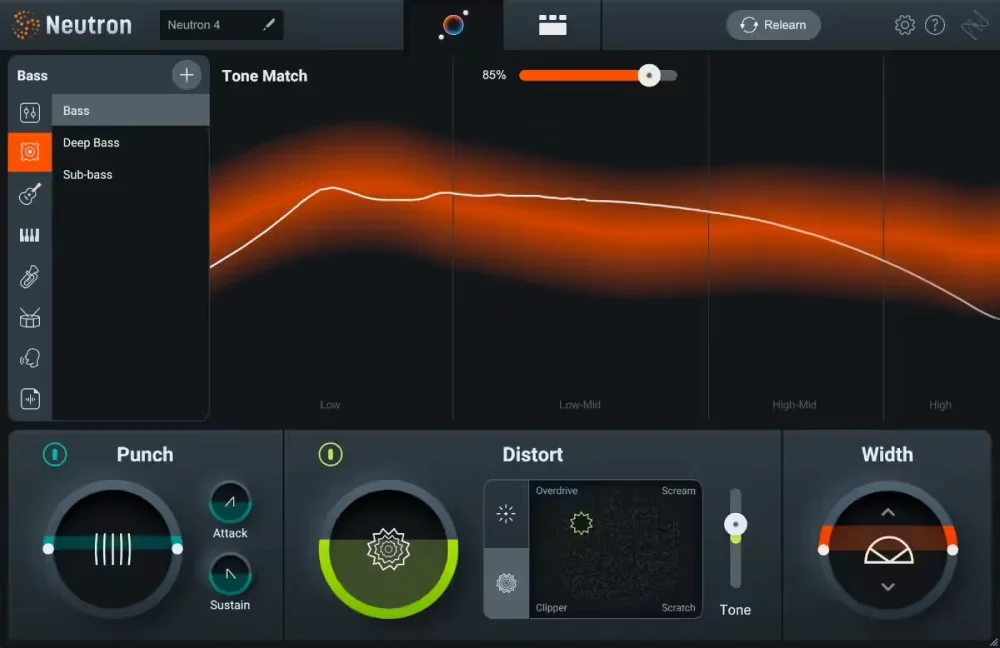
Image: iZotope
What AI does well
- A quick starting point: a first balance or first EQ in seconds.
- Clean-up: spotting resonances, noise and frequencies that mask each other.
- Separation: things that were impossible a few years ago, like isolating a vocal for a remix.
- Demos: a decent master to send a demo without spending the evening on it.
What it does badly
- It doesn't know your intention: a vocal deliberately set back, dirty drums, a chorus that needs to explode. The assistant aims for a "correct" sound, not your sound.
- It standardises: the same targets give results that sound alike.
- It fools you with volume: many automatic treatments make the sound louder, and so more flattering at first.
- It can get in the way of learning: accepting a suggestion without understanding why it works doesn't help you improve.
The strengths of mixing by ear
A mixer makes artistic decisions: what should be in front, the emotion of a section, the contrast between verse and chorus. They adapt their choices to the genre, the artist, the reference. It's slow at first, but it's what gives a mix its identity. Its limits: ear fatigue and time, especially on repetitive tasks.
The third way: simple, fast tools
Between fully automatic and fully manual, there's a middle approach: plugins that don't decide for you but get straight to the point, so the right decisions come quickly. That's the philosophy of Toool plugins, which don't claim to be AI:
- Anodyn: a classic compressor (ATTACK, RELEASE, RATIO, MIX) with CHARACTER for colour, SMOOTH for behaviour, SIDECHAIN EQ for detection and STEREO LINK for the image. Few knobs, lots of sounds.
- Anadrive: five saturation modes, separate DRIVE and GRAIN, CLEAN BASS to keep the lows firm.
- Reverbia: 25 reverbs, a CHARACTER knob from realistic to unreal, built-in dual EQ and ducking.
- Diffonic: A/B comparison at matched volume and blind, to check that your choices, or an assistant's, really improve the sound.

Diffonic
Find out if a change really sounds better: level-matched A/B and blind test.
$29 $58 -50%
VST3 · AU · AAX · Windows & macOS
See DiffonicQuick comparison
| AI assistant | By ear | Simple tools + ears | |
|---|---|---|---|
| Speed to start | Very fast | Slow | Fast |
| Sonic identity | Low | Strong | Strong |
| Learning | Low | Strong | Strong |
| Main risk | Generic sound | Fatigue, time | Judging by volume (hence Diffonic) |
Two concrete examples
An electronic track
An assistant suggests a starting EQ on the synth bus and spots a clash with the bass: useful. After that, the choices that make the track are made by ear: Anadrive in DISTO with CLEAN BASS on the bass, a coloured Anodyn on the drum bus, Reverbia with ducking on the lead. Before signing off, a matched-volume comparison with the assistant's version in Diffonic.
A guitar-and-vocal song
Here, the assistant tends to over-compress and over-brighten the vocal. It's better to start from gentle compression (Anodyn, SMOOTH to the right, CHARACTER low), a natural reverb and little processing. Online mastering can serve as a reference, but the hand-made version is often more alive, as long as you check it at matched volume.
How to bring in AI without losing control
- Treat it as an opinion, not a decision: look at what it changes and ask yourself why.
- Keep your references and compare with them, not just with the unprocessed version.
- Always compare at matched volume, ideally blind.
- Keep it for technical tasks (clean-up, separation, demos) and keep the artistic choices for yourself.
And tomorrow?
Assistants will keep improving, especially on technical tasks. But the more alike automatic tools become, the more a mix with clear intentions will stand out. Your ears, and the ability to check your choices without being fooled by volume, remain the skills that matter.
In short
AI is a good assistant and a poor artistic director. Use it to save time, keep the musical decisions, and check everything at matched volume. For this year's trends, read our plugin trends for 2027, and to equip your session, our pick of the best mixing plugins.